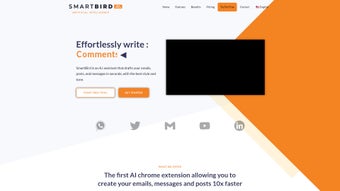

Download SmartBird – AI Writing Assistant for Fast, Accurate Drafts
Overview – Why SmartBird Stands Out in the AI Writing Landscape
SmartBird is a web‑based AI writing assistant that lives right inside your Chrome browser as an extension. Designed for busy professionals, social‑media managers, and anyone who writes daily, SmartBird promises to cut drafting time by up to ten times compared with traditional manual typing. The tool does more than just generate text; it intelligently analyses incoming messages—whether they are emails, WhatsApp chats, or Telegram conversations—and produces context‑aware replies in the tone you specify.
In addition to instant responses, SmartBird provides a robust suite of utilities: a built‑in summarizer for long articles, a grammar‑and‑style corrector, and a multilingual translator that supports over 30 languages. All of these capabilities are delivered through a clean, intuitive UI that appears as a sidebar or pop‑up within the web pages you already use, meaning no extra windows or disruptive software installations. Because it’s subscription‑based, users receive continuous updates, security patches, and new AI models without having to manage separate license keys.
Whether you need a polite customer‑service email, a snappy tweet, or a detailed project update, SmartBird adapts its output to match the professional or casual voice you need, helping you maintain brand consistency while saving precious time.
Key Features That Make SmartBird a Must‑Have Tool
Core Functionalities at a Glance
- AI‑Powered Drafting: Generates emails, social‑media posts, and messages up to ten times faster than manual typing.
- Automated Response Engine: Analyzes inbound communications and creates context‑appropriate replies in seconds.
- Multi‑Platform Chat Responder: Seamlessly works with WhatsApp, Telegram, and other web‑based chat services.
- Smart Summarizer: Condenses long articles, reports, or threads into concise bullet points.
- Grammar & Style Corrector: Detects errors, suggests improvements, and aligns text with your chosen tone.
- Integrated Translator: Translates content across 30+ languages while preserving nuance and style.
- Tone Customization: Choose from formal, friendly, persuasive, or technical tones for each piece of content.
- Secure Cloud Processing: All AI computations run on encrypted servers, ensuring data privacy.
- Continuous Updates: Subscription includes regular AI model upgrades and new feature rollouts.
- One‑Click Export: Copy generated text directly into your email client, social platform, or document editor.
Beyond the headline features, SmartBird’s design philosophy centers on frictionless integration. The extension automatically detects the text field you’re typing into, offering real‑time suggestions without requiring you to switch tabs. Its contextual awareness means that if you’re replying to a customer complaint, the AI will prioritize empathy and problem‑solving language.
For marketers, the tone selector can instantly switch a draft from a serious product announcement to a playful promotional tweet, maintaining brand voice consistency across channels. Moreover, the summarizer isn’t just a word counter—it intelligently extracts key points, preserving the original intent, which is especially valuable for busy executives who need quick briefings. The translation engine leverages neural machine translation, delivering near‑human quality output, making it easier for global teams to collaborate without language barriers.
All these capabilities are bundled into a single, lightweight Chrome extension, meaning you don’t have to juggle multiple apps or subscriptions to achieve the same productivity boost.
Installation, Usage, Compatibility, and Pros & Cons
Step‑by‑Step Installation Guide
Getting SmartBird up and running is straightforward. Follow these steps:
- Open the Chrome Web Store and search for “SmartBird AI Writing Assistant.”
- Click “Add to Chrome” and confirm the permission request (access to read and change data on websites you visit).
- After installation, the SmartBird icon appears next to the address bar. Click it to sign in using your subscription credentials.
- Complete the quick onboarding wizard, where you set your preferred language, default tone, and integration preferences for email, WhatsApp, and Telegram.
- Navigate to any supported web platform (Gmail, Outlook Web, Twitter, Facebook, LinkedIn, WhatsApp Web, Telegram Web). SmartBird automatically detects editable fields and shows a small “AI” button on the right side.
How to Use SmartBird Effectively
Once installed, using SmartBird is as simple as clicking the AI button while composing a message. A side panel slides out, offering three main tabs: “Draft,” “Reply,” and “Tools.” In the “Draft” tab, type a brief prompt (e.g., “Follow‑up email for project X”) and select the desired tone. SmartBird instantly generates a full draft that you can edit, copy, or send directly.
In the “Reply” tab, open an incoming email or chat, click “Auto‑Reply,” and let the AI propose a response based on the conversation context. The “Tools” tab houses the summarizer, grammar corrector, and translator. Each tool works with a single click: paste the text, hit “Summarize,” and receive a concise version within seconds.
For translators, select the target language, and SmartBird returns a polished translation ready for copy‑paste. The extension also remembers your last-used settings, so you can maintain consistency across sessions without re‑configuring each time.
Compatibility Details
SmartBird is a Chrome‑only extension, making it compatible with any operating system that runs Google Chrome—Windows 10/11, macOS 12+, Linux distributions, and Chrome OS. Because it operates within the browser, there’s no separate desktop client, which reduces resource usage and simplifies updates. The tool works on all major web‑based email and social platforms, including Gmail, Outlook Web, Yahoo Mail, Twitter, Facebook, LinkedIn, Instagram (via the web interface), WhatsApp Web, and Telegram Web. Mobile browsers are not currently supported for the full feature set, but the underlying AI service can be accessed through the SmartBird web portal on any device.
Pros and Cons – A Balanced Look
- Pros
- Massive time savings – up to 10× faster drafting.
- Context‑aware replies reduce manual editing.
- All‑in‑one suite (drafting, summarizing, correcting, translating).
- Tone customization ensures brand‑consistent communication.
- Secure cloud processing and regular updates with subscription.
- Lightweight Chrome extension – no heavy software installation.
- Supports major email and social platforms out‑of‑the‑box.
- Cons
- Only works in Chrome; not available for Firefox, Safari, or Edge extensions.
- Requires an active internet connection for AI processing.
- Subscription model may be a barrier for occasional users.
- Mobile browsers have limited functionality compared to desktop.
- Initial permission request may raise privacy concerns for some users.
Review Summary
Overall Rating: 4.5/5
SmartBird delivers on its promise of faster, higher‑quality writing. The AI’s contextual awareness and tone controls are standout features that make it ideal for professional communication. While the Chrome‑only limitation and subscription cost are notable, the productivity gains outweigh these drawbacks for power users.
Frequently Asked Questions (FAQ) & Final Thoughts
Is SmartBird safe for handling confidential information?
Yes. All data sent to SmartBird’s servers is encrypted using TLS 1.3, and the service complies with GDPR and CCPA standards. The company states that it does not store any content longer than necessary for processing the request.
Can I use SmartBird on multiple devices with the same account?
Absolutely. Your subscription is tied to your login credentials, so you can install the Chrome extension on any computer and sign in to access the full feature set.
What happens if I cancel my subscription?
You will retain access to the extension until the end of your current billing period. After that, the AI generation features will be disabled, but the extension will remain installed for manual use.
Does SmartBird support languages other than English?
Yes. The built‑in translator covers more than 30 languages, and the drafting engine can generate content directly in several major languages, including Spanish, French, German, and Portuguese.
How often are new AI models released?
SmartBird’s development team rolls out major model upgrades quarterly, with smaller performance tweaks and bug fixes released monthly. All updates are applied automatically through the Chrome extension.
Conclusion – Is SmartBird Right for You?
If you spend a significant portion of your day composing emails, social‑media updates, or instant‑messenger replies, SmartBird offers a compelling solution that blends speed, accuracy, and contextual intelligence. Its ability to draft, summarize, correct, and translate—all from within the familiar Chrome environment—means you can stay focused on strategic work rather than repetitive typing. While the Chrome‑only requirement and subscription cost might deter occasional users, the productivity boost for power users and teams handling high‑volume communication is undeniable. Ready to transform the way you write? Download SmartBird now and experience a faster, smarter way to communicate.



.png)



